FFT (Fast Fourier Transform)
Goal of This Sample
The goal of this sample is to run two ROS2-FPGA nodes of 1024-point FFT processing on PYNQ-Z1.

Tested Environment
The following environments were tested:
Vivado 2022.1
Vitis HLS 2022.1
PYNQ-Z1 (xc7z020clg400-1)
OS: PYNQ v2.5
ROS2: eloquent
M-KUBOS(xczu19eg-ffvc1760-2-i)
OS: PYNQ v2.5
ROS2: eloquent
Kria KR260 (K26 SOM: XCK26-SFVC784-2LV-C)
OS: Kria-PYNQ v3.0
ROS2: humble
Preparation
Let’s prepare before using meta-FOrEST.
To use meta-FOrEST, the code to be run as FPGA logic must have done C Synthesis and export RTL.
In preparation.tcl, the board parts of PYNQ-Z1 are set. To target a different board part, change the argument of the set_part function in preparation.tcl.
HLS of C++ code with the following code:
vitis_hls preparation.tcl
When the process is finished, you will see a directory named vitis_hls.
Make a Vivado Block Design with meta-FOrEST!
Please set up the path for Vivado before executing meta-forest gen_bd command. In our environment, we set the following.
source /tools/Xilinx/Vivado/2022.1/settings64.sh
You can create a block design with the following command. The parameter values should be adapted to your environment.
meta-forest gen_bd \
 --ip_directory ./vitis_hls/solution1  \
 --target_part xc7z020clg400-1 \
 --IP hls_fft \
 --count 2  \
 --step_to write_bitstream
When the process is finished, you will see a directory named vivado.
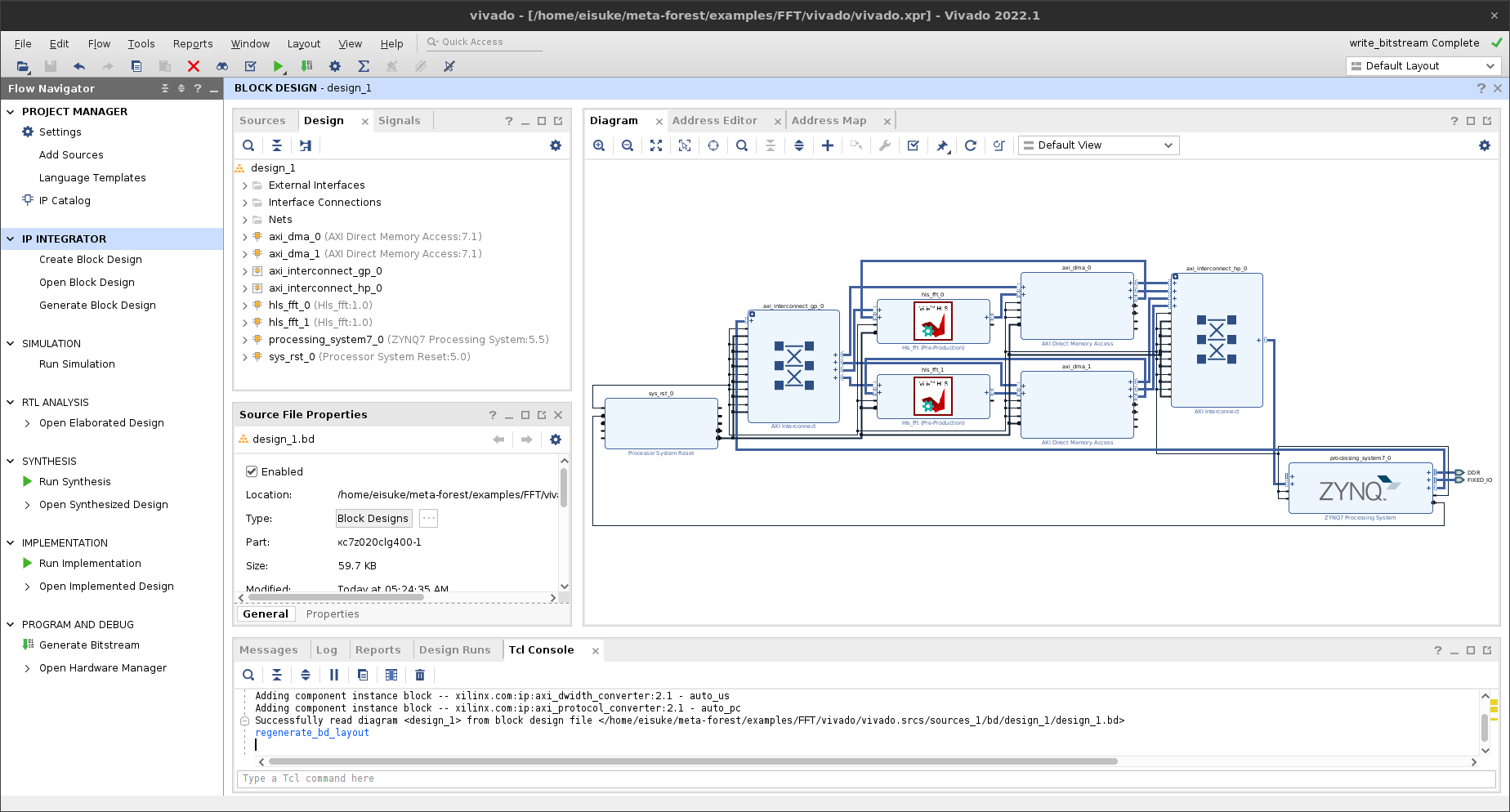
Let’s transfer the created bitstream to the Zynq SoC with the following command.
scp vivado/vivado.runs/impl_1/design_1_wrapper.bit xilinx@xxx.xxx.xxx.xxx:/home/xilinx/dev_ws/fft_2.bit
scp vivado/vivado.gen/sources_1/bd/design_1/hw_handoff/design_1.hwh  xilinx@xxx.xxx.xxx.xxx:/home/xilinx/dev_ws/fft_2.hwh
Generate ROS2 Packages for ROS2-FPGA Nodes
Finally, let’s generate the package for the ROS2-FPGA nodes on your FPGA board.
Please set up the path for ROS2 before executing meta-forest gen_node command. In our environment, we set the following.
source /opt/ros/eloquent/setup.bash
By executing the code below, the code will be generated in the ROS2 workspace as shown in the image. The workspace and bitstream value should be adapted to your own environment.
meta-forest gen_node \
--workspace /home/xilinx/dev_ws \
--package_name fft \
--bitstream /home/xilinx/dev_ws/fft_2.bit \
--test \
--IP hls_fft \
--count 2 \
--in stream_input --in_type float32[1024] \
--out stream_output --out_type float32[2048]
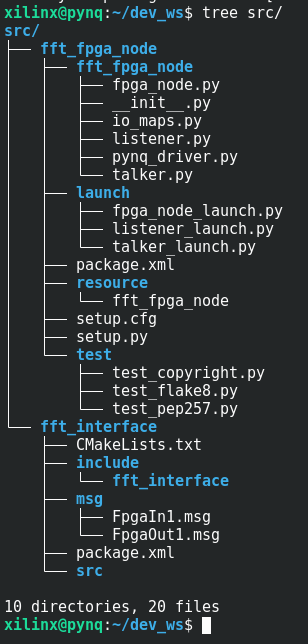
After launch the FPGA node as root user, check if you can see the topics in the ros2 topic list in another terminal before launch the Talker/Listener node. If not, you may need to run the Talker/Listener node as root user as well as the FPGA node.
ros2 launch fft_fpga_node fpga_node_launch.py # as root
ros2 launch fft_fpga_node listener_launch.py
ros2 launch fft_fpga_node talker_launch.py
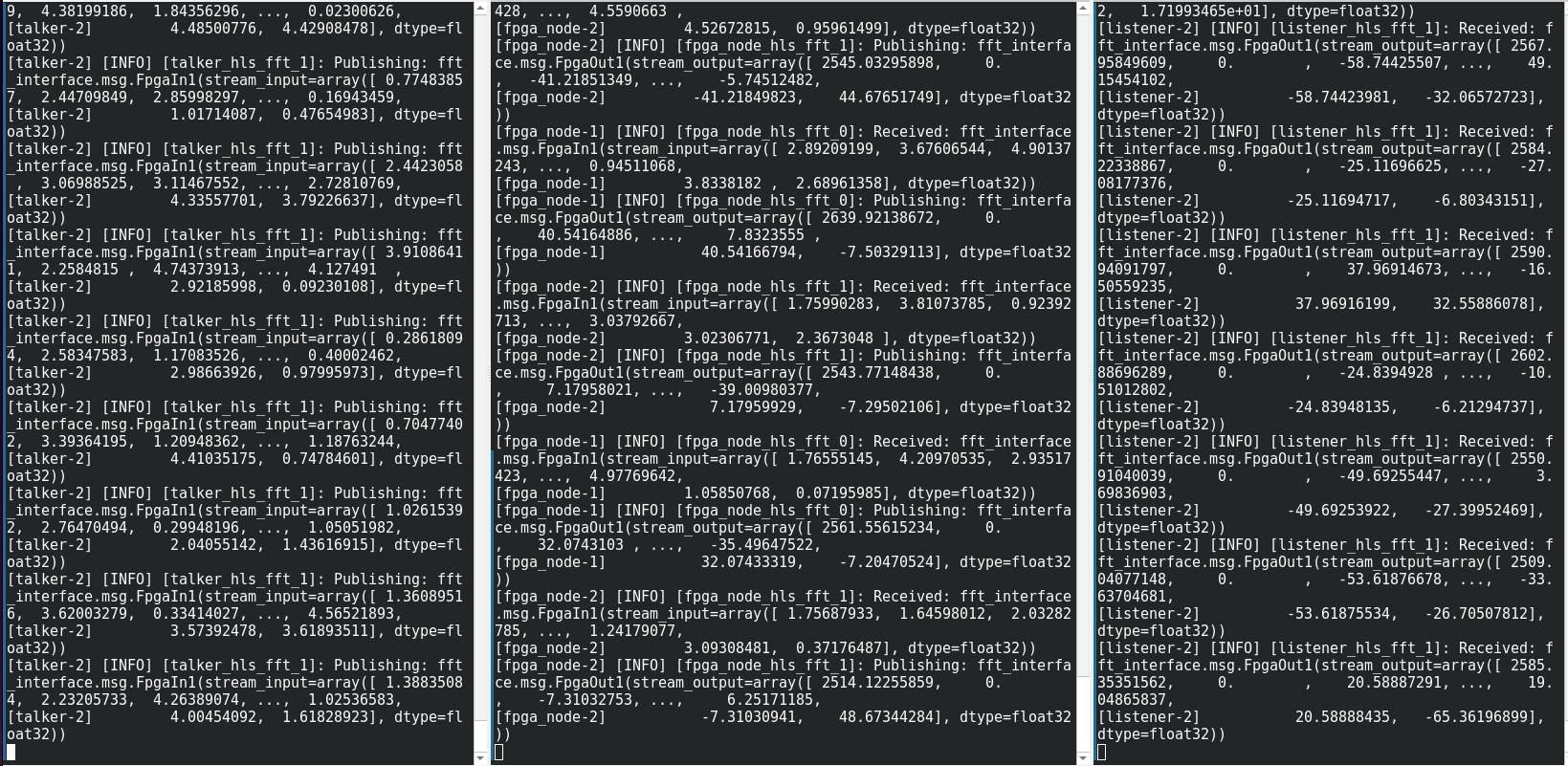
It works!
Left: Talker node feeding data (input data source) into ROS2-FPGA node
Center: ROS2-FPGA node performing FFT processing
Right: Listener node receiving output from ROS2-FPGA node